

For Serving Activations Within a Local Network
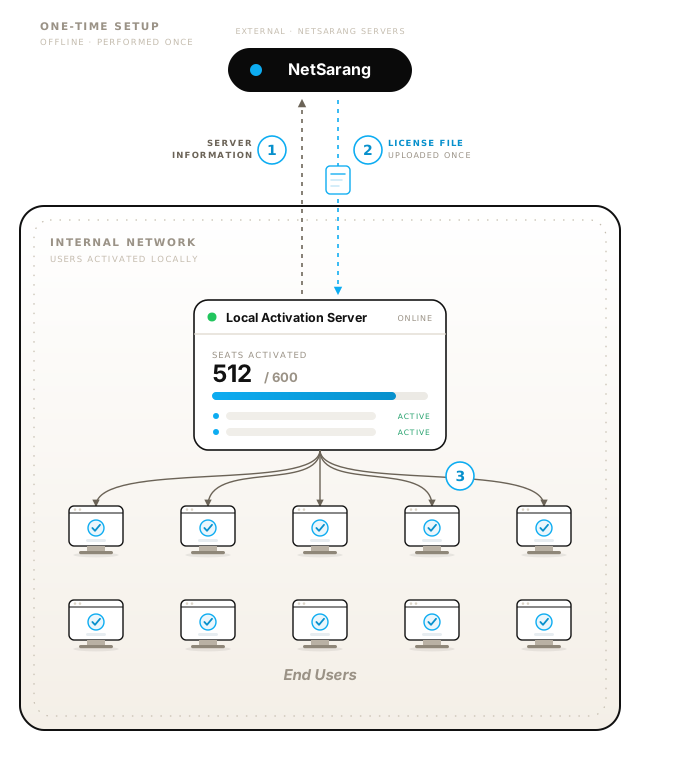
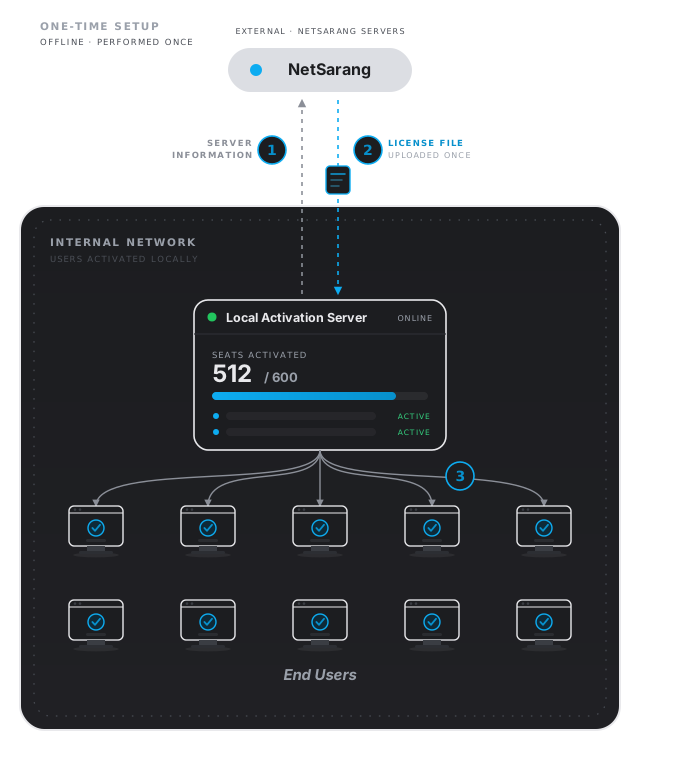
Enterprises with a large quantity of users without access to an external network may find it cumbersome or impossible to activate their users through the conventional Offline Activation method. With NetSarang's Local Activation Server, you can install a license server within your own internal network to serve your users without the need for them to contact NetSarang's servers.
For a detailed overview, installation and usage instructions, refer to the NetSarang Local Activation Server Manual.
Install the Local Activation Server on an internal server and send the information to NetSarang.
NetSarang will generate a license file to upload onto your Local Activation Server.
End Users can activate from the Local Activation Server.
Current and new customers with licenses of Xmanager Power Suite, Xmanager, Xshell, and Xftp and valid maintenance are eligible. There is a one-time setup fee for the Local Activation Server. Minimum license volumes are required. Contact a sales representative at sales@netsarang.com for information on eligibility and pricing.
Our software requires that users activate their license after purchasing. While we do provide an offline activation method for users with devices not connected to the internet, this method may not be feasible for enterprises that require large scale deployment. A Local Activation Server can be installed within a company's network so its employees can activate their licenses without ever needing to communicate with NetSarang Servers.
After installing a Local Activation Server within your network, NetSarang will provide a License File specific to your server which is loaded with activations. Your users can install NetSarang Software normally, and choose the Local Activation Server method for activating their license. They'll need to enter the Port and IP address of the Local Activation Server.
Yes, there is a one-time setup fee. Please contact sales@netsarang.com for more information.
Yes. You can place your Local Activation Server anywhere your users will have the ability to communicate with it to receive activations.
Yes.
The Local Activation Server supports both Windows (Windows Server 2008 or later) and Linux (CentOS 7 or later, Ubuntu 14 or later, or openEuler 22.03 or later). For more detailed requirements, please refer to the Local Activation Server manual.
Your Local Activation Server's License File validity date is aligned with your licenses' maintenance. If your maintenance expires, so will your Local Activation Server. Our sales team will follow up with you well before your maintenance expiration date to confirm your intent to renew. Once maintenance is renewed, you will be sent a new License File to upload to your Local Activation Server. We encourage you to renew maintenance in a timely manner to avoid interruptions.
If you choose not to renew maintenance, your Local Activation Server will no longer function. At this point, your users can activate through NetSarang's online servers or via the offline activation method. Please note that Concurrent Licenses without a Local Activation Server will function as Standard User Licenses.
Standard User Licenses are registered to specific users and are not meant to be shared amongst a larger group of users. Therefore, the Local Activation Server will require activations be checked out for a minimum of 90 days before the activation can be returned to the Local Activation Server.
Concurrent User Licenses are floating licenses which are meant to be shared amongst a larger group of users. Activations that are checked out are returned to the Local Activation Server immediately when a user exits the NetSarang Software. This allows another user to check out the activation once someone stops using the NetSarang Software.
To learn more about Local Activation Server behavior for the different license types, please refer to the Local Activation Server manual.
Yes, but you will need to contact support@netsarang.com for approval and to receive a new License File. We recommend you install the Local Activation Server on a stable server with little to no downtime as well as no need for frequent migrations.
Yes. We provide a Three-Server Redundancy option which allows 3 separate servers to form a Triad and serve activations to your users. As long as 2 of the servers are up and able to communicate with each other, the Local Activation Server will function. This prevents a single point of failure. Please refer to the Local Activation Server manual for more details regarding Three-Server Redundancy.
Yes, you can create either a user Whitelist or Blacklist but not both. The Local Activation Server uses the users' Windows username as an identifier.
Yes. The Local Activation Server includes a web-based license server manager (lmadmin). Through lmadmin, you can view your total/available activations, see which users are using activations, set alerts, and more.
To learn more about lmadmin, please refer to the Local Activation Server manual.